How Coach Pickle Learns Your Game: The Pickleball Coach That Remembers
Coach Pickle builds a personalized profile of your pickleball game from your videos, drills, games, and chats, then uses it to deliver sharper feedback, realistic timelines, and a clear path to your next level.
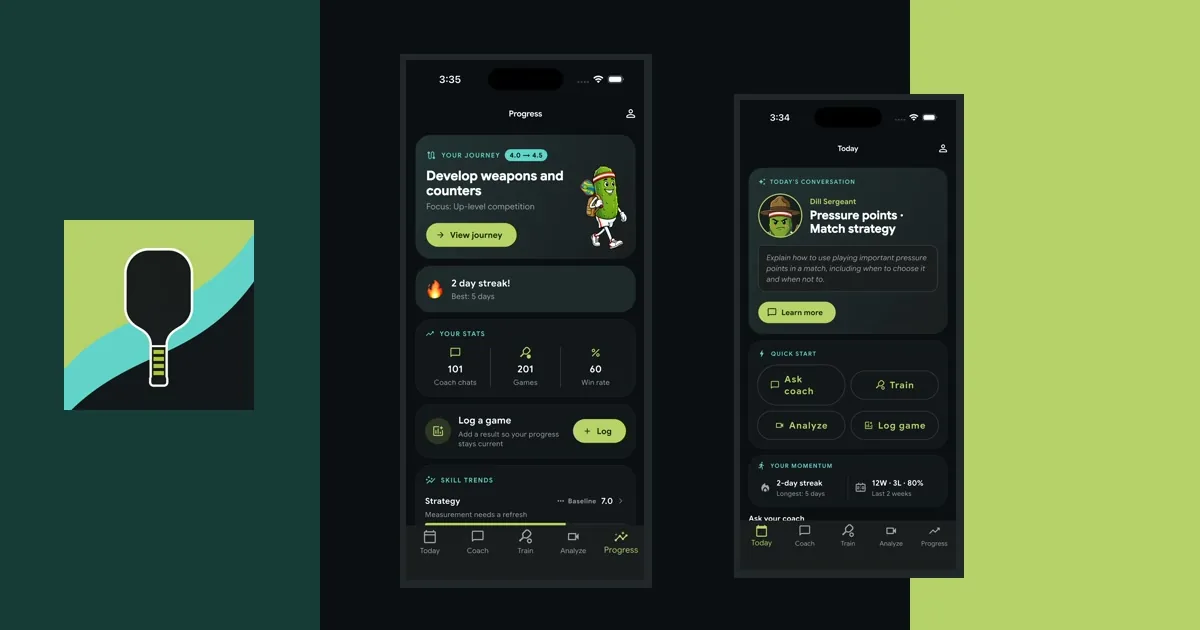
Most AI tools answer the question in front of them and forget it the moment you close the app. A real coach is different. A coach who has watched your last ten sessions can spot the thing actually holding you back today, because the picture has been building all along. Without that picture, even the smartest assistant is stuck quoting the textbook.
Coach Pickle was built around the idea that the coach should have context. Every drill you finish, every video you upload, every game you log, and every conversation you have with the app adds another piece of the puzzle. Over time, the feedback you get stops feeling generic and starts sounding like advice from someone who actually knows your game. This post is about how that works, what the coach is actually noticing, and what it means for how quickly you level up.
What “knowing your game” actually means
Coach Pickle pulls coaching signal from four places, and you decide how much to share. None of it is required. The bare app works on its own, but the more channels you feed it, the sharper the coach gets.
Videos you upload. Match clips and drill reps both count. The app gives you a per-skill rating across six skills (serving, returning, dinking, volleying, court positioning, and strategy) on a 1 to 10 scale, and it also flags specific patterns it sees in your reps: a late contact point, a drop that floats high, a backhand elbow that keeps dropping. Each video adds another data point to the running picture.
Drills you finish. When you tap “I did this drill” on the drill walkthrough, the app records what you practiced. There’s an optional “How did it feel?” follow-up: struggled, solid, or easy. That single rating tells the coach whether the drill landed for you or needs another pass next week.
Games you log. A simple win or loss takes two taps. You can add optional details: format (doubles, singles, mixed), opponent level (below you, same as you, above you), and how well you played on a 1 to 10 slider. We’ll come back to opponent level in a minute, because it carries more weight than the others.
Chats with the coach. When you mention something in passing (“my third-shot drops are starting to land”), the coach quietly notes the skill mention and adjusts. You don’t have to file a status update. Talking is enough.
Nothing here is mandatory. The richer the inputs, the more specific the coaching, but the coach has plenty to say even if all you ever do is chat with it.
Trajectory, not snapshot
Here’s where a typical AI coaching tool and Coach Pickle diverge. Most tools score what’s in front of them: you upload a video, you get a rating. That’s a snapshot. Coach Pickle stores those snapshots and tracks how they move.
Each of the six skills gets a current rating plus a 30-day and 90-day trend. So instead of “your dinks are a 6,” the coach can say something like: “your dinks moved from 5.5 to 6.0 over the last month, and the pop-up issue we flagged in March is showing up less often.”
That difference matters. The first version is a verdict. The second is a conversation about progress.
It also matters because plateaus get visible. If your dinking has been parked at 6.5 for two months while your volleys keep climbing, the coach can stop suggesting “keep working on dinks” and start asking why the curve flattened. Maybe the drill mix needs to change. Maybe the pop-up issue isn’t really fixed, just hidden by easier reps. The trajectory tells the coach where to dig.
This is also the part that compounds. The first video you upload is useful. The fifth video is more useful, because the coach can compare it against the four before it. By the tenth video, the coach has a real read on your wing-by-wing development, and the feedback gets concrete in a way it could not have been on day one.
Patterns you wouldn’t notice yourself
One bad rep is noise. The same fault flagged three times across three videos is a signal, and the coach treats it that way.
The app keeps a running list of recurring findings. If “late contact on lobs” gets called out in three of your last six clips, the coach now treats that as a focus area, not a one-off. The next time you ask for a drill, the late-contact issue is part of the context the coach is working from. The next time you upload a video, the coach is specifically looking for whether it’s still happening.
This is the part most players underestimate. You probably know your own game well, but you’re not the most reliable judge of it. You remember the rallies you won and the spectacular errors. You don’t remember the quiet pattern that shows up in three out of five matches, because you weren’t tracking it. The coach is. That’s why a chat with Coach Pickle stays specific where a generic AI gets generic. The coach is responding to your recurring patterns, not pickleball-in-general.
A few examples of the kinds of findings that tend to surface:
- Drops popping up high enough to attack in 2 of the last 3 drill clips
- Returns landing short in the front third in 4 of the last 5 match clips
- Backhand volley contact going wide in roughly half the kitchen exchanges
- Footwork drift behind the baseline showing up after long rallies
None of those would jump out in any single clip. All of them are findings worth changing your practice over, and the coach can only point them out because it has the comparison set.
The secret signal: opponent level
A 70% overall win rate sounds great until you ask who you’ve been playing. If you’ve been stomping below-level rec games at the local park, that 70% doesn’t tell anyone much. A 45% win rate against players a half-level above you is far more telling, and it’s a much better predictor of whether you’re actually ready to move up.
That’s why the game log has an optional opponent-level field. Three choices, no math: below me, same level, above me. The coach uses those three buckets to compute three separate win rates, and the one against up-level opponents is the strongest input into the “ready for a level-up check?” decision.
This is one of those places where being honest with the log unlocks something real. Mark a tough loss against a stronger player as “above me” and the coach can credit the close score correctly. Lump every game together as a plain win or loss and the signal flattens out. The coach can only do something with the truth.
You can still log games as plain win or loss in two taps. The detailed version is there for players who want the coach to see the texture.
The Journey: where you are, where you’re going
All this signal lands in a single screen called your Journey. It answers four questions every improving player should be able to answer about themselves.
Where am I right now? A current level, a recent trajectory, and what you’re working on this month.
Where am I going? The next half-level (or full level, if you’re early in the game) and the three specific things blocking you from getting there. These are not generic bullet points. They are ranked, named, and given a concrete criterion. “Push third-shot drop success rate from 60% to 80%” reads differently than “improve your drop.”
How long will it take? A realistic timeline range with the inputs that produced it shown right there. “6 to 13 months, based on playing 1-2 times per week and age 50-59.” If you played four times a week instead of one, the same target would shrink. If you bumped your age range, it would stretch. You can see exactly why the number is what it is, which is half of trusting it.
What should I be doing this week? A typical-week template: how many drill sessions, how many games, how much video review, and what each session should focus on.
There’s also a “don’t chase yet” section, which is the part a lot of players actually need most. ATPs, advanced stacking, elite-level speedups: shots that look impressive on YouTube and don’t move the needle for a 3.0 player working on their drop. The coach is willing to say out loud “save these for later,” which is the kind of honest editing a friendly internet thread rarely does.
For more on the 3.0-to-4.0 transition specifically, our post on improving your pickleball rating from 3.0 to 4.0 walks through the bottlenecks and what the journey actually looks like at that level.
The “this week” view
The Journey is the long view. “This Week” is the concrete one.
Every Sunday evening, the app regenerates a weekly plan based on where you actually are. Each session is specific: day slot, drill or games, how many minutes, a focus phrase, and (for drills) a recommended drill pulled from the Coach Pickle drill library. Tap any drill session and the matching drill opens up: hero illustration, step-by-step mechanics, drill flow, measurable goal.
The adaptive part is the satisfying part. If last week’s drop drill went “easy,” next week’s drill steps up. If it went “struggled,” next week stays on the same fundamentals a little longer. If you didn’t log it at all, the coach plays it safe and assumes the work is still in progress. The “How did it feel?” rating is small, but it’s what drives whether the plan accelerates, holds, or backs off.
Players who play once a week get short plans. Players who play four times a week get fuller ones. The coach builds toward the time you actually have, not the time it wishes you had.
The level-up moment
Most players spend longer than they should at one rating before they “officially” move up, because there is no clear moment of permission. Coach Pickle tries to fix that.
The coach watches for a stack of signals that suggest you’ve genuinely outgrown your current rating: skill ratings trending up across the board, drills increasingly logged as “easy,” a strong win rate against same-level players, a respectable win rate against players above you, consistent activity over weeks. When enough of those pile up, a banner appears on your Journey screen: the coach thinks you’re ready for a level-up check.
The check itself is a short self-assessment, around five to seven multiple-choice questions about specific patterns at the next level. It returns one of three verdicts: confirmed, close, or not ready. If confirmed, your level updates and your plan regenerates around the new target. If “close,” the coach tells you the one or two specific gaps to close before the next check.
A few things the coach will not do. It won’t tell you that you “regressed” or “slipped.” Even a “not ready” verdict is framed forward, with what to work on next, not with what you should feel bad about. The check shows up only when you’ve earned the opportunity to take it, so seeing the banner at all already means something.
The coach reaches out
The other thing memory unlocks is the coach getting in touch with you instead of always waiting on you.
If you enable check-ins (every 3 days, weekly, or every 2 weeks, whichever fits your schedule), the coach sends a short push notification asking how things are going. Tap it, and a chat thread opens with the coach speaking first, with an opening message tailored to whatever’s been happening in your game lately. Maybe it’s the third-shot drop you’ve been drilling. Maybe it’s the match you logged on Saturday. Maybe it’s the gap before your level-up check.
Your reply seeds a real conversation, and whatever you say (a quick win story, a frustration, a question) feeds back into the picture the coach is building. The app stops being a tool you open and starts being a coach who keeps tabs on you between sessions.
What this means for you
Stack all of this up and the practical effect is simple: less guessing.
Less guessing about whether you’re actually improving, because the trajectory is right there. Less guessing about what to drill, because the recurring findings tell the coach where to look. Less guessing about whether you’re ready to move up, because the readiness check is sitting on actual data, not on your gut on a good day. Less guessing about how long it’ll take, because the timeline shows the inputs and you can sanity-check them yourself.
The big claim is not that the AI is smarter than it was yesterday. It’s that the picture is sharper than it was yesterday. Coach Pickle levels you up faster because the feedback gets more accurate every time you use it, and accurate feedback is what closes the gap between practice and improvement.
Try it
Coach Pickle starts with a free 7-day trial on the App Store and Google Play, then continues as one $49-per-year membership unless you cancel before the trial ends. Your membership includes the chat coach, the full drill library, and AI video analysis from day one. The coaching profile starts building from your first conversation, and it keeps getting sharper as you go. If you want to read more about how AI coaching fits into pickleball overall, our AI coaching guide is a good companion piece. Otherwise, open the app and start talking.

Want Personalized Coaching?
Coach Pickle gives you an AI pickleball coach in your pocket. Get strategy advice, drills, and mental game coaching tailored to your skill level.