AI Pickleball Drill Video Analysis: How to Fix Your Technique with Your Phone
AI-powered pickleball video analysis for drills. Record one of 9 supported focuses — from serves and dinks to footwork and live rallies — and get a rep-by-rep technique breakdown, ratings, and targeted fixes.
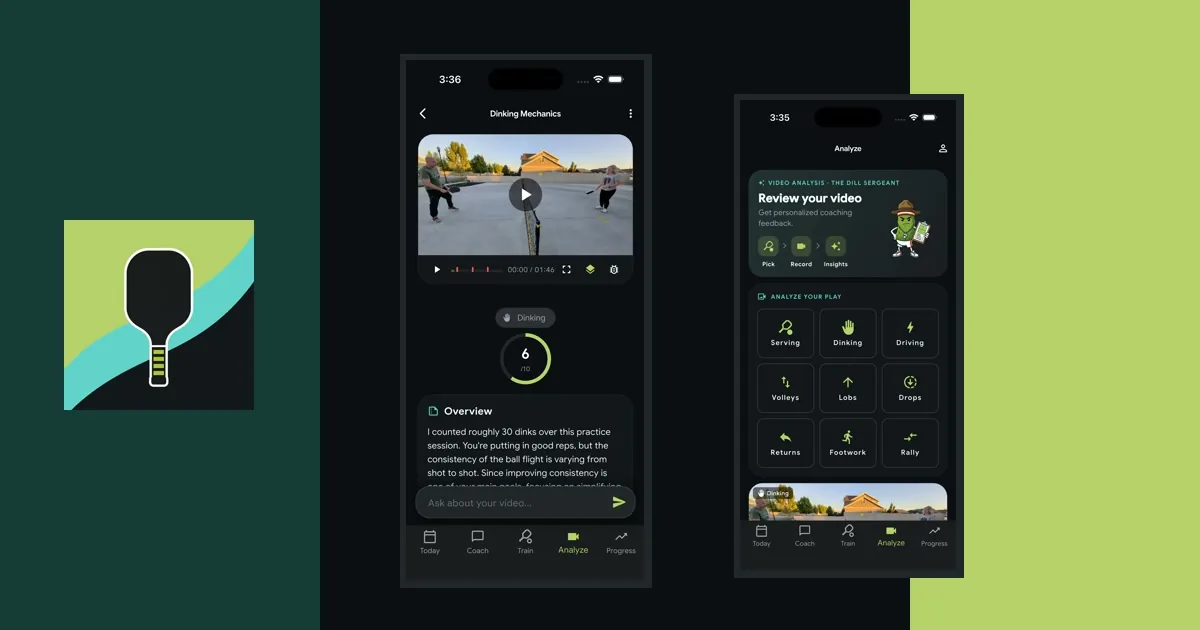
You have a phone. You have a paddle. You have a bucket of balls. That is now enough equipment to get a structured technique review of your pickleball drills — not a subjective vibe check from a friend at the fence, but a real, component-by-component analysis of your form with specific, prioritized fixes. AI pickleball drill video analysis has quietly become one of the most useful tools an improving player can use, and this guide walks through what it is, how it works, what it is good at, where it falls short, and how to record a drill video that gets you the best possible feedback.
This article is focused on drill video analysis — you record one of 9 supported focuses (dinking, serving, driving, volleys, lobs, drops, returns, footwork, or rally play), and an AI coach breaks down what you did well and what to fix. It is not about full match or game video review. The reason matters: focused recordings give the AI a clean sample of the skill or rally pattern you selected, which is exactly the condition under which computer-vision and large-language-model analysis shines. Full match video — with its longer rallies, moving players, and context-dependent decisions — is a different problem.
Why Drill Video Analysis Actually Works
For years, “video analysis” in pickleball has meant one of two things: either a human coach charging $75–$150 for a film review, or a drawing app where you slow-mo your own footage and guess at what you are seeing. Both approaches have limits. Human coaches are excellent but expensive and slow (and you often need to wait days or weeks to hear back). Drawing apps are fast and cheap but put all of the analytical burden on the player — you still have to know what to look for, and beginners by definition do not.
AI drill video analysis sits in a new spot. Because the AI is not limited by time or a calendar slot, it can respond in minutes. Because it is driven by computer vision models trained on human movement and a coaching-focused language model, it can actually identify technique flaws, not just show them to you slowly. And because drills are constrained — one skill, one player, one repeating pattern — the AI has a strong prior on what “good” looks like and a clean signal to compare your reps against.
The result is something that used to require a coach, a tripod, and a week of patience: a structured, rep-aware breakdown of your technique, delivered while the session is still fresh in your muscles.
What an AI Drill Review Actually Contains
The output of a drill video analysis is not “here is a pep talk about your dinking.” It is a structured review with specific sections. A good AI drill analysis — the kind you get from a tool like Coach Pickle — typically includes:
An overall rating. A 1–10 score that anchors the rest of the review. This is useful partly as a headline, partly as a thing to compare against your next review of the same skill a few weeks later. Watching that number move is one of the most motivating feedback loops in self-directed practice.
A rep count and consistency assessment. How many reps did you actually hit? How consistent were they? A technique review means very little without knowing whether your AI coach watched you hit 8 reps or 80, and whether the form held up across the session or only on your first few.
A technique breakdown across 5–6 components of the skill. This is the meat of the review. For dinking, that might be stance and ready position, grip pressure, paddle face, contact height, and follow-through. For a serve, it is different — toss, stance, weight transfer, contact, finish. Each component gets its own observation and its own 1–10 rating, so you know exactly which part of the motion is the limiter.
Strengths tied to actual reps. Good reviews — AI or human — are specific. “You did a nice job on rep 5, where your back knee clearly bent and your paddle came up through the ball” is infinitely more useful than “nice dinking, keep it up.”
Prioritized areas for improvement. Not every flaw matters equally. A good AI review labels each fix as high, medium, or low priority, and ties it to the observations that surfaced it. A high-priority fix is the one that will move your rating the most if you address it next.
Recommended follow-up drills. This is the part that turns analysis into practice. Given what the AI just saw in your reps, which drills should you do next? A review that ends with “low-contact dinking, 3 sets × 2 minutes, bent-knee setup” gives you your next session’s plan.
Which Skills Work Best for AI Drill Analysis
Not every pickleball skill is equally well suited to AI video review. The sweet spot is skills where the motion is constrained, the camera angle is easy to set up, and the rep structure is clear. Those are the conditions that let computer vision lock onto your body and give the AI something to analyze.
In practice, AI drill analysis works well for:
- Dinking. Short, contained motion. Easy to record from the side. Clear technical components.
- Serves. Self-initiated, one rep per attempt, no opponent complication.
- Drives. A full-body swing with clear setup, contact, and follow-through phases.
- Volleys. Short compact motion; consistency shows up fast on camera.
- Lobs. Full-swing mechanics with a very specific goal (height + depth).
- Drops. The most technique-sensitive shot in the game — AI review is surprisingly good here because the bar for “good form” is narrow.
- Returns. Rep-able if you have a partner feeding, and the technique components are well defined.
- Footwork. Split step, recovery, cross-step — AI can see whether you split on the ball strike.
- Rally play. A live exchange shows how shot selection, movement, and recovery hold up when isolated mechanics meet real pressure.
Full match video is a harder problem and a different feature category; the short answer is that if you want AI review, record a drill.
How to Record a Drill Video That Gets Good AI Analysis
The quality of your AI review depends directly on the quality of your footage. You do not need expensive equipment, but you do need to set up the shot deliberately. A few principles apply to every skill:
Pick a Stable Position for the Phone
Prop the phone on a bench, a pickleball bag, a phone tripod, or the net strap. The AI does not need a cinematographer, but it does need the frame to hold still. A shaky handheld video makes it much harder for the computer vision model to track your body.
Frame Yourself Fully in the Shot
Your full body should be in frame for the whole drill. For dinking and volleys, a side angle roughly at the kitchen line works best. For serves and returns, a side angle behind the baseline works well. For footwork, a wider angle from the baseline corner lets the AI see your steps.
Record in Portrait, Landscape is Fine Too
Either orientation works for analysis. Most apps record in portrait by default and that is what phones are designed for; landscape can sometimes give you more context around your body.
Shoot in Good Light
Outdoor daytime is best. Gym lighting works. Dusk with stadium floodlights is harder — long shadows and high-contrast lighting can confuse body tracking models.
Hit Enough Reps
Aim for 20–50 reps of a drill, which usually lands in the 1–3 minute range. More reps means a more reliable consistency signal and a more representative technique breakdown. If you only hit 4 reps and then stop, the AI is doing its best with a tiny sample.
Keep the Drill Clean
Avoid chatting, breaks, or switching skills mid-video. If you want to drill dinking and then serves, record two separate videos. The AI is giving you one skill’s breakdown per video.
How This Fits Into a Realistic Practice Loop
The point of drill video analysis is not to obsess over form every time you practice. It is to get structured feedback often enough that your self-directed practice stays on track.
A realistic cadence looks like this. Pick one skill you want to improve — say, third-shot drops. Warm up, hit a focused drill, and record 2–3 minutes of it. Submit the video for AI analysis. Read the review while you cool down. Note the high-priority fix and the recommended follow-up drill. Two or three sessions later, do the follow-up drill and record another 2–3 minutes. Compare the new technique ratings against the old ones. That is the loop.
You are not recording every shot of every practice. You are using video as an occasional mirror, a few times per skill per month, to make sure your practice is actually addressing the limiting flaw. That is what converts “I drilled dinking today” into “I drilled dinking today and my contact height is higher than it was a month ago, so my paddle-face rating is up too.”
AI Drill Analysis vs. a Human Coach
People sometimes ask whether AI drill analysis replaces a human pickleball coach. The honest answer is that it replaces some of what coaches do and leaves the rest untouched.
What AI does as well as a human: identifying specific, observable technique flaws in a constrained drill. Counting reps. Pointing out consistency issues. Recommending drills for the flaw it saw. Delivering the review in minutes instead of days.
What a human coach still does better: watching you play live matches, reading your body language and your tactical tendencies, catching subtle things that only show up when someone is actively competing, and giving in-person demonstrations. A human also holds you accountable in a way an app cannot.
A good rule of thumb: use AI drill analysis for technique work on specific skills between your coaching lessons (or as your “coach” if you do not work with one). Use a human coach for strategic development and in-person check-ins.
What to Ask Your AI Coach After a Drill Review
Most AI drill analyses are interactive — after the review, you can follow up with questions. This is where a lot of the real learning happens. Good follow-up questions include:
- “Explain what ‘paddle face open at contact’ means and how to fix it.”
- “Show me a drill that isolates the contact-height fix you flagged as high priority.”
- “What cue should I focus on during my next drill session?”
- “Is my consistency issue a grip thing or a footwork thing?”
- “If I had 15 minutes to work on this skill tomorrow, what would you have me do?”
The analysis surfaces the flaw. The follow-up conversation turns it into a plan.
Common Questions About AI Pickleball Drill Video Analysis
How long can the drill video be? Drills are capped at 8 minutes, which is comfortably enough for a dense, rep-heavy session. In practice, 1–3 minutes is the sweet spot — enough reps for a real consistency signal, short enough to make review quick.
Do I need to appear alone in the video? No. Feeders and partners are fine. Good AI drill analysis uses your profile photo as a reference so it knows who to focus on in the frame. Your partner’s technique will not be part of the review.
What if my phone camera is older or lower resolution? Modern AI drill analysis pipelines degrade gracefully. The computer-vision model will skip rules it cannot reliably evaluate rather than invent observations, so a slightly lower-quality video still gets you a valid review — just with fewer technique components scored.
Can I get drill analysis on a phone, or do I need a computer? Everything runs in the phone app. You record, submit, and get the review all on the same device.
Is this the same as watching yourself back in slow motion? Not at all. Slow-motion review tells you what you look like. AI drill analysis tells you what is working, what is not, and what to do about it — with specific fixes ranked by priority.
The Bottom Line
AI pickleball drill video analysis is not a gimmick. It is the closest thing a recreational player has ever had to a private coach who is available in the parking lot after practice, watches 50 of your reps, and hands you a structured technique plan before you get in the car. It is not a replacement for playing, for drilling with a human, or for lessons. It is an additional feedback source in your practice loop — and for most improving players, the missing one.
If you want to try it, Coach Pickle includes AI drill video analysis for all 9 supported focuses: dinking, serving, driving, volleys, lobs, drops, returns, footwork, and rally play. Record in the app, get the breakdown, ask your coach follow-up questions, and get back to the court with a plan.
Need a drill to record? The Coach Pickle drill library has 58 to choose from — organized by DUPR skill level, with step-by-step mechanics and measurable goals. Run a drill from the library, then queue an AI review when you’re done. The two features were built to feed each other.
Want Personalized Coaching?
Coach Pickle gives you an AI pickleball coach in your pocket. Get strategy advice, drills, and mental game coaching tailored to your skill level.